5. Homepage
Completion requirements
The system allows to all users, whether logged in or not, to view:
- in the first part, a section that shown some default metrics; they are static value, not linkable and relevant to the resources included in the platform. In particular, the information shown is:
- the total number of projects within the platform
- the total number of projects published and available within the platform
- the total number of users connected within the platform
- the total number of services available within the platform
- the total number of services published and available within the platform
- the total number of executions launched.
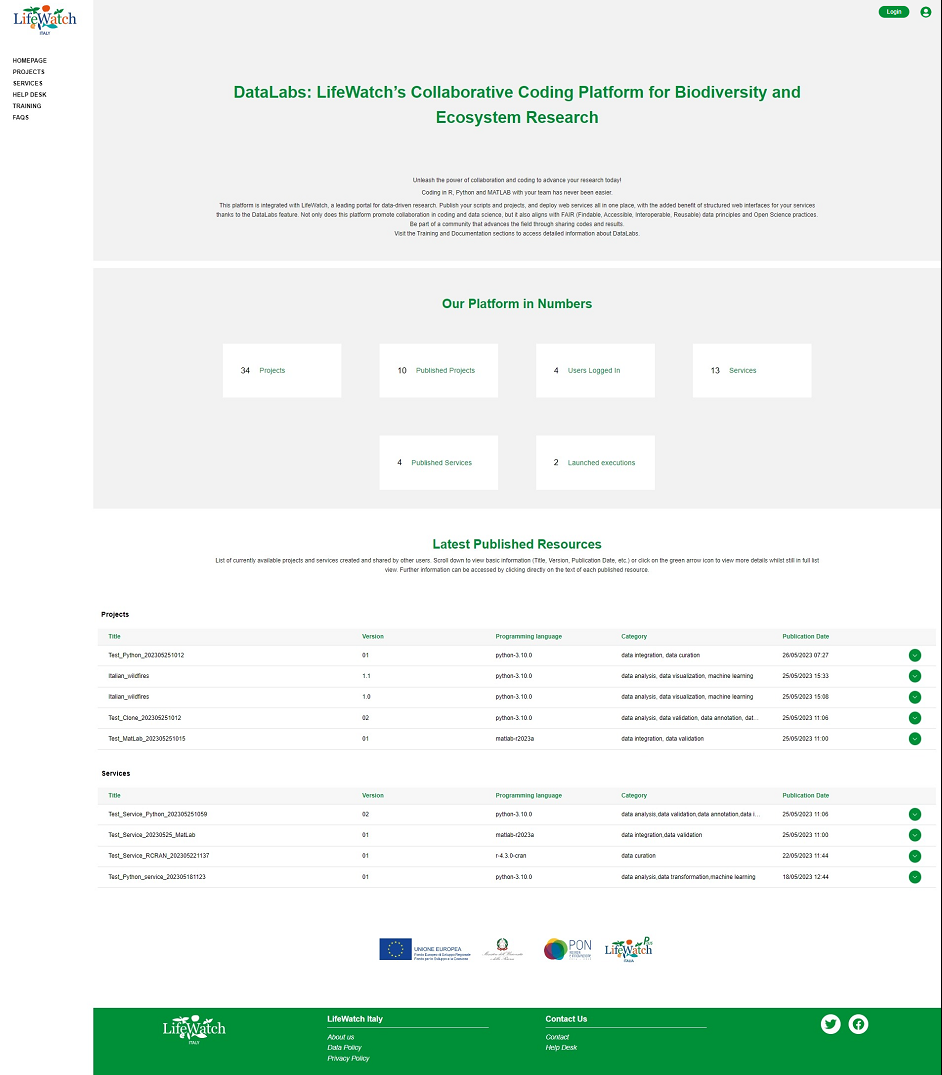
- in the second part, the list of the last 10 resources (5 projects and 5 services) published, organized in tables and sorted by decreasing publication date; in addition to the publication date, for each resource are always visible some basic information such as:
- Title, the name given to the resource
- Version, the version provided to the resource
- Programming Language, the programming language used
- Category, one or more categories associated with the resource
- Publication date, date of publication of the resource.
Further information can be seen if you click on the collapse button for opening the accordion; in this case the system also allows viewing of the fields:
- Abstract, a short description with the main features of the resource
- Creator, name and mail of the user who created the resource