1. Custom JupyterLab environment
Completion requirements
1.4 Template Scripts
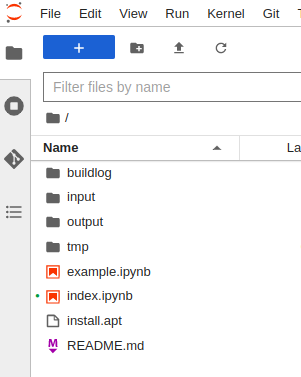
Based on the language selected during project generation (Python 3, R, R-cran, Matlab), the system provides you a project template. It contains general indications and small code examples.
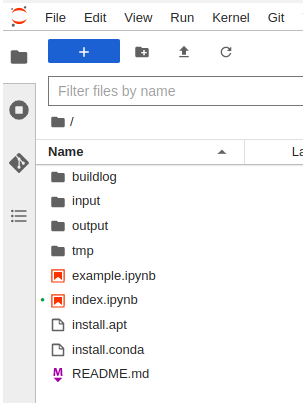
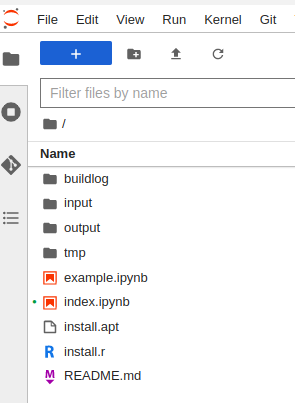
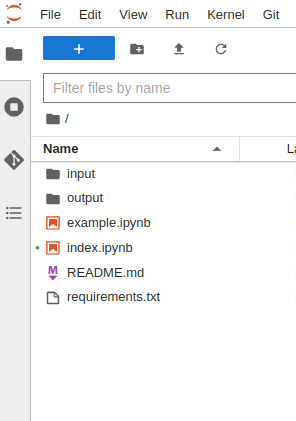
The basic structure of the project template (Figure 2) is as follows:
- buildlog: contains eventual logs for library installation.
- input: this folder contains the input dataset files;
- output: every script output must be placed inside this folder;
- tmp: can be used to write temporary files during execution that should not be committed to git repository.
- example.ipynb: This is an example notebook that contains some basic functions examples to work with input and output
- index.ipynb: this is the main script file containing the source code. As a starting point, this file is populated with some basic examples.
- README.md: this file contains a detailed description of the developed Project. As a starting point, it contains a user guide on how to start a new project.
- install.apt: this file can be used to install additional packages through apt that can be required.
- requirements.txt: this file contains the required R libraries needed by the main script to run.
- install.conda: this file contains the required libraries needed by the main script to run.
Make sure to list every library, one for each line.
Please note: to apply the changes to this file (and install any new library) a complete restart of the project is needed.
To start working on the project, open the file index.ipynb double clicking on it.